
Async Video Benchmarks: How Boom Compares to Meetings, Manual Editing, and Basic Screen Recorders
Sara
Author
Most teams already know their status meetings take too long. The harder question is: how much time are they actually costing you?
We wanted to put some numbers behind that, so we compared four ways of sharing a typical weekly status update: a live meeting, a manually edited recording, a generic screen recorder, and an async video update recorded with Boom.
We looked at three things that are easy to measure: total time to send the update, editing time saved, and caption turnaround.
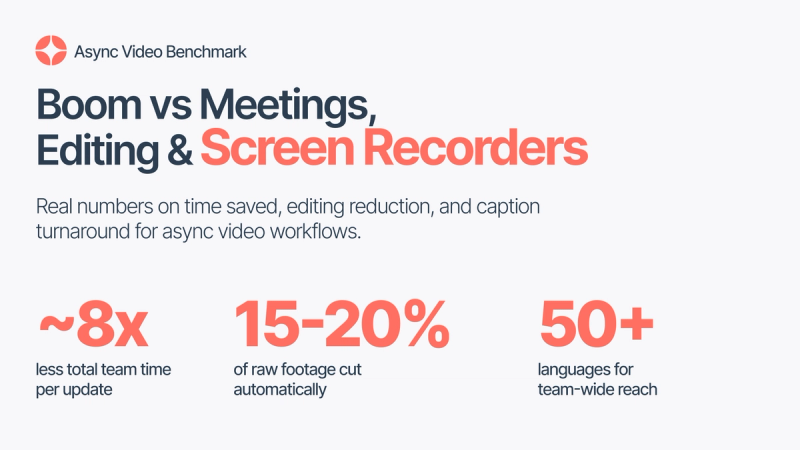
The result was pretty clear. For a recurring status update with six people, the async version used roughly 85 to 90 percent less total team time.
Here’s how we measured it and how you can run the same benchmark with your own team.
Why status meetings cost more than they look
A 30-minute meeting rarely costs a team just 30 minutes.
If six people are on the call, that is already three hours of combined team time. Then there’s the scheduling, the context switching, and the time it takes everyone to get back into whatever they were working on before the meeting.
The research backs this up. A Harvard Business Review survey of senior managers found that a large majority consider meetings unproductive and say meetings keep them from finishing their own work. Research from the University of California, Irvine found it takes an average of more than 23 minutes to fully regain focus after an interruption. And analysis reported by CBS News found that large companies can lose upwards of $100 million a year to meetings their own employees consider unnecessary.
That doesn’t mean meetings are bad.
Some conversations genuinely need to happen live. But status updates are different. If one person is mainly talking while everyone else is listening, using synchronous time for that information can be difficult to justify.
That’s where async video can make a real difference.
Benchmark 1: Time to send
What we measured: the total team time spent on one weekly status update, from creating the update to everyone receiving it.
For our meeting baseline, we used a 30-minute status meeting with six attendees.
Meeting: Creating the update: 30 min live × 6 people = 180 minutes of total team time Scheduling and coordination: 5 to 10 min per person = 30 to 60 minutes of total team time Consuming the update: included in the meeting Total team time: 210 to 240 minutes of total team time
Boom async update: Creating the update: about 5 minutes to record and share Scheduling and coordination: None Consuming the update: 2 to 4 min each × 6 people = 12 to 24 minutes Total team time: 17 to 29 minutes
That works out to roughly eight times less total team time for the async version.
For a six-person team, replacing just one recurring 30-minute status meeting could give the team back around three hours of collective time every week.
And the biggest difference isn’t even how quickly the video is recorded.
With an async update, people can watch it at 1.5x, skip to the parts they need, or use the transcript instead of sitting through the entire thing. There’s also no waiting for everyone to join, no scheduling back and forth, and no need to block the same 30 minutes on six calendars.
Benchmark 2: Editing time saved
What we measured: how much a raw screen recording gets shorter when pauses and dead air are removed automatically.
Raw recordings are rarely as clean as we imagine them being.
There’s the pause while you think. The “let me just pull that up.” The false start. The few seconds spent looking for the right tab. None of these moments are a problem while you’re recording, but they add up when someone else has to watch the finished video.
In our tests, this dead air made up around 15 to 20 percent of the total recording length.
So, for example, a 10-minute raw update can become roughly 8 minutes without anyone having to manually edit it.
Doing the same thing manually means opening an editing tool, going through the timeline, finding every pause, and cutting each one out. In practice, that can easily turn into a second work session that takes almost as long as the original recording.
Boom’s automatic pause and dead-air removal is designed to remove that extra work.
It’s also worth being clear about what this feature does. It removes silence and pauses from the recording. It doesn’t rewrite your update, change your message, or restructure what you said.
You record naturally, and Boom handles the cleanup.
Benchmark 3: Caption turnaround
What we measured: how long it takes after you stop recording for captions and a transcript to be ready to share.
For a short update under five minutes, captions and the transcript are typically ready within one to three minutes of stopping the recording. Longer recordings scale roughly in proportion.
That might not sound like a huge deal, but captions are one of those things that are easy to skip when they require extra work.
People watch workplace videos in all kinds of situations. They might be in an open office, between calls, or somewhere they simply can’t turn the sound on. And if adding captions means downloading the video, uploading it to another tool, waiting for processing, and then bringing it back into your workflow, most teams won’t bother.
With Boom, captions and transcripts are included, so they can be part of the same async video workflow.
Benchmark 4: Localization coverage
What we measured: how many languages the same update can reach without recording it again.
Boom includes voice dubbing in 50+ languages.
That means one recording can be dubbed for a distributed team without needing a translator, another recording session, or a separate localization tool.
For international teams, this can change the way async communication works.
A live meeting only works for the people who can attend at that particular time. An async video can be watched whenever someone is available, and with voice dubbing, the same update can reach people in their own language.
The full comparison
Here’s how the four workflows compare:
Meetings: A six-person status meeting takes 210–240 minutes of total team time once you include the meeting and coordination time. There’s no editing, but everyone has to be there at the same time, and notes, captions, and translations require extra work.
Manual editing: You record the update, then spend additional time cutting pauses, cleaning it up, and adding captions or a transcript. Localization usually requires separate tools or another recording.
Generic screen recorders: They make recording easy, but most of the work comes afterward. Editing, captions, transcripts, and other AI features usually require additional tools or manual work.
Boom: The same update takes about 17–29 minutes for six people. Boom automatically removes pauses and dead air, provides captions and transcripts, and supports 50+ languages for voice dubbing.
Boom’s free plan includes basic recording and sharing for up to 25 videos. Features such as automatic dead-air removal, captions, transcripts, summaries, and 50+ language dubbing are available with Boom Premium, which costs a few dollars a month.
The main difference is simple: instead of recording now and doing more work later, Boom handles most of the cleanup and sharing in the same workflow.
How to run this benchmark on your own team
You don’t need a research team or a complicated setup to test this.
All you need is one recurring meeting and about two weeks.
1. Pick one meeting
Choose a meeting that is mostly about sharing information or status updates.
Skip decision-making meetings and brainstorms. Those usually need real-time discussion.
2. Record the same update in Boom
Instead of holding the meeting, record the same information as an async video and share it with the team.
3. Let the cleanup happen automatically
Don’t manually edit the recording. The point is to measure what the workflow actually looks like when you use the tools as intended.
4. Share it when the meeting would have started
Drop the video link into your usual team channel at the same time the meeting would normally begin.
5. Track two things
Measure how long it took you to create and share the update, and whether anyone needed a live follow-up.
6. Compare the results
Use the numbers from the original meeting and compare them with the total team time spent on the async version.
The follow-up question is probably the most useful one.
Did anyone actually need the meeting?
If the async update regularly leads to a live call anyway, you may have discovered that the meeting wasn’t really a status meeting in the first place. Keep that one live and test a different meeting.
For more ideas on creating updates people will actually watch, see our guide to creating async videos for teams and creators.
When you should still hold the meeting
Async video isn’t meant to replace every meeting.
There are still plenty of situations where getting people together live makes sense:
- The discussion needs real back-and-forth, negotiation, or debate
- The topic is sensitive, personal, or emotionally loaded
- The team is making a decision rather than simply receiving information
- Something is genuinely urgent and needs an answer within minutes
A simple rule of thumb is:
If the information doesn’t need a live reaction, it probably doesn’t need a live meeting.
FAQ
What is an async video workflow?
An async video workflow is a way of sharing recorded updates that teammates can watch on their own schedule instead of joining a live call. It works especially well for status updates, walkthroughs, handoffs, and product demos where information needs to be shared rather than discussed in real time.
How much time does async video actually save?
For a 30-minute status meeting with six attendees, the meeting costs around 210 to 240 minutes of total team time once scheduling and coordination are included. The same update recorded and shared asynchronously takes around 17 to 29 minutes. That’s roughly eight times less total team time.
How is Boom different from a generic screen recorder?
A generic screen recorder mainly captures your screen and gives you a recording. Boom Premium adds features such as automatic pause and dead-air removal, captions, transcripts, summaries, and voice dubbing in 50+ languages, making the recording ready-to-share as soon as you finish recording.
How fast are captions ready?
For an update under five minutes, captions and the transcript are typically ready within one to three minutes of stopping the recording.
Does automatic editing change what I say?
No. Boom removes pauses and dead air from the recording. It doesn’t rewrite, restructure, or change your actual content.
What should I measure in my own async video benchmark?
Start with three things: time to send, edit time saved, and caption turnaround. Measure the entire workflow from starting the recording to having a shareable link, and include every separate editing, captioning, or uploading step in your total.
Related reading
- The Complete Guide to Async Video Communication
- How to Create Async Videos for Teams and Creators
- Top Async Video Features for Freelancers
- Boom vs Tella: The AI Auto-Editing and Summary Comparison